
Existing-account access
Starda Casino Login
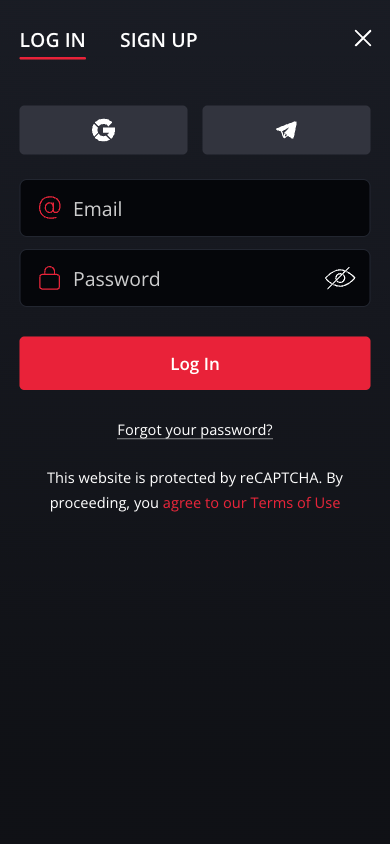
Already have a Starda account? Continue to Starda, choose LOG IN, and use the email address and password registered to your account. The SIGN UP tab is for registration.
If you cannot access an existing account, use password recovery or ask support for help. Do not create another account: the terms allow only one account per player, household, email address or IP address.
Sign in to your existing account
- Continue to Starda and select LOG IN.
- Enter your registered address in Email.
- Enter your password in Password.
- Select Log In.
Keep your credentials private. If you use a shared device, sign out when you finish and avoid saving your password on that device.
Reset a forgotten password
Use the recovery option instead of guessing repeatedly or registering again.
- Open LOG IN and select Forgot your password?
- In Reset Your Password, enter your registered address in Email.
- Select Get New Password and follow the recovery instructions you receive.
Check that you entered the address used for your account. If the recovery message does not arrive, check your junk folder before contacting support. Never share your password with anyone offering to recover the account for you.
When login still does not work
| What is happening? | What to do next |
|---|---|
| Your email or password is rejected | Check the registered email address, accidental spaces and Caps Lock. If you cannot recall the password, use the reset option. |
| You cannot access your registered email | Ask account support for help restoring access. Do not open a second account to work around the problem. |
| A verification or restriction message appears | Follow the account instructions and ask support what is needed. Resetting a password does not resolve an identity check or an account restriction. |
| You suspect someone else has accessed the account | Contact support promptly, secure your email account and change any compromised passwords. |
Get help with account access
The support address published in Starda’s terms is [email protected]. Describe the problem, the email registered to the account and any error message. Never include your password or a payment-card security code.
For information about the documents that may be requested, read verification and withdrawals. If you want to pause gambling or need support, see responsible-gambling information.